Update readme files (#14172)
This commit is contained in:
 Joel Challis
 GitHub
parent
48d0ad28e7
commit
87cdb1cf9a
25 changed files with 74 additions and 79 deletions
|
|
@ -4,12 +4,12 @@
|
|||
|
||||
A 16 key macropad, with USB C, RGB underglow and backlight.
|
||||
|
||||
Keyboard Maintainer: QMK Community
|
||||
Hardware Supported: The PCBs, controllers supported
|
||||
Hardware Availability: [KPrepublic](https://kprepublic.com/products/bm16a-16-keys-custom-mechanical-keyboard-pcb-plate-programmed-numpad-layouts-qmk-firmware-with-rgb-bottom-underglow-alps-mx); [AliExpress](https://www.aliexpress.com/store/product/bm16a-16-keys-Custom-Mechanical-Keyboard-PCB-plate-programmed-numpad-layouts-qmk-firmware-with-rgb-bottom/3034003_32970629907.html)
|
||||
* Keyboard Maintainer: QMK Community
|
||||
* Hardware Supported: The PCBs, controllers supported
|
||||
* Hardware Availability: [KPrepublic](https://kprepublic.com/products/bm16a-16-keys-custom-mechanical-keyboard-pcb-plate-programmed-numpad-layouts-qmk-firmware-with-rgb-bottom-underglow-alps-mx); [AliExpress](https://www.aliexpress.com/store/product/bm16a-16-keys-Custom-Mechanical-Keyboard-PCB-plate-programmed-numpad-layouts-qmk-firmware-with-rgb-bottom/3034003_32970629907.html)
|
||||
|
||||
Make example for this keyboard (after setting up your build environment):
|
||||
|
||||
make bm16a:default
|
||||
make kprepublic/bm16a:default
|
||||
|
||||
See the [build environment setup](https://docs.qmk.fm/#/getting_started_build_tools) and the [make instructions](https://docs.qmk.fm/#/getting_started_make_guide) for more information. Brand new to QMK? Start with our [Complete Newbs Guide](https://docs.qmk.fm/#/newbs).
|
||||
|
|
|
|||
|
|
@ -2,12 +2,12 @@
|
|||
|
||||
A 16-key macropad, with USB C and per-key RGB backlighting. This is a variant of the BM16A, but with low profile Choc switches.
|
||||
|
||||
Keyboard Maintainer: QMK Community
|
||||
Hardware Supported: The PCBs, controllers supported
|
||||
Hardware Availability: [KPrepublic](https://kprepublic.com/collections/pcb/products/bm16s-16-keys-custom-mechanical-keyboard-pcb-plate-programmed-numpad-layouts-qmk-firmware-with-rgb-switch-leds-choc-switch); [AliExpress](https://www.aliexpress.com/item/bm16s-16-keys-Custom-Mechanical-Keyboard-PCB-plate-programmed-numpad-layouts-qmk-firmware-with-rgb-switch/32999247908.html); [Massdrop](https://www.massdrop.com/buy/78169)
|
||||
* Keyboard Maintainer: QMK Community
|
||||
* Hardware Supported: The PCBs, controllers supported
|
||||
* Hardware Availability: [KPrepublic](https://kprepublic.com/collections/pcb/products/bm16s-16-keys-custom-mechanical-keyboard-pcb-plate-programmed-numpad-layouts-qmk-firmware-with-rgb-switch-leds-choc-switch); [AliExpress](https://www.aliexpress.com/item/bm16s-16-keys-Custom-Mechanical-Keyboard-PCB-plate-programmed-numpad-layouts-qmk-firmware-with-rgb-switch/32999247908.html); [Massdrop](https://www.massdrop.com/buy/78169)
|
||||
|
||||
Make example for this keyboard (after setting up your build environment):
|
||||
|
||||
make bm16s:default
|
||||
make kprepublic/bm16s:default
|
||||
|
||||
See the [build environment setup](https://docs.qmk.fm/#/getting_started_build_tools) and the [make instructions](https://docs.qmk.fm/#/getting_started_make_guide) for more information. Brand new to QMK? Start with our [Complete Newbs Guide](https://docs.qmk.fm/#/newbs).
|
||||
|
|
|
|||
|
|
@ -12,10 +12,10 @@ This firmware was originally taken from a kbfirmware.json and manually converted
|
|||
|
||||
Make example for this keyboard (after setting up your build environment):
|
||||
|
||||
make bm40hsrgb:default
|
||||
make kprepublic/bm40hsrgb:default
|
||||
|
||||
Flashing example for this keyboard:
|
||||
|
||||
make bm40hsrgb:default:flash
|
||||
make kprepublic/bm40hsrgb:default:flash
|
||||
|
||||
See the [build environment setup](https://docs.qmk.fm/#/getting_started_build_tools) and the [make instructions](https://docs.qmk.fm/#/getting_started_make_guide) for more information. Brand new to QMK? Start with our [Complete Newbs Guide](https://docs.qmk.fm/#/newbs).
|
||||
|
|
|
|||
|
|
@ -4,13 +4,12 @@ A 40% mechanical keyboard.
|
|||
|
||||
This firmware was originally taken from a kbfirmware.json and converted through [kbf_qmk_converter](https://noroadsleft.github.io/kbf_qmk_converter/). You may find the original `.json` files [here](https://drive.google.com/drive/folders/11DowBYrFN_uCNa9Q9bXwuMn91vmZYBcG).
|
||||
|
||||
|
||||
Keyboard Maintainer: [MechMerlin](https://github.com/mechmerlin)
|
||||
Hardware Supported: bm43a PCB
|
||||
Hardware Availability: [KPRepublic](https://kprepublic.com/products/bm43a-bm43-43-keys-40-custom-mechanical-keyboard-pcb-programmed-numpad-layouts-qmk-firmware-with-rgb-bottom-underglow-alps-mx)
|
||||
* Keyboard Maintainer: [MechMerlin](https://github.com/mechmerlin)
|
||||
* Hardware Supported: bm43a PCB
|
||||
* Hardware Availability: [KPRepublic](https://kprepublic.com/products/bm43a-bm43-43-keys-40-custom-mechanical-keyboard-pcb-programmed-numpad-layouts-qmk-firmware-with-rgb-bottom-underglow-alps-mx)
|
||||
|
||||
Make example for this keyboard (after setting up your build environment):
|
||||
|
||||
make bm43a:default
|
||||
make kprepublic/bm43a:default
|
||||
|
||||
See the [build environment setup](https://docs.qmk.fm/#/getting_started_build_tools) and the [make instructions](https://docs.qmk.fm/#/getting_started_make_guide) for more information. Brand new to QMK? Start with our [Complete Newbs Guide](https://docs.qmk.fm/#/newbs).
|
||||
|
|
|
|||
|
|
@ -8,8 +8,6 @@ A 60% hotswap inswitch RGB (north facing) keyboard from KP Republic.
|
|||
|
||||
Make example for this keyboard (after setting up your build environment):
|
||||
|
||||
make bm60poker:default
|
||||
make kprepublic/bm60poker:default
|
||||
|
||||
See the [build environment setup](https://docs.qmk.fm/#/getting_started_build_tools) and the [make instructions](https://docs.qmk.fm/#/getting_started_make_guide) for more information. Brand new to QMK? Start with our [Complete Newbs Guide](https://docs.qmk.fm/#/newbs).
|
||||
|
||||
Video tutorials for customizing the layout: [QMK Tutorials](https://www.youtube.com/playlist?list=PLZlceRZZjRugJFL-vnenYnDrbMc6wu_e_) - By MechMerlin
|
||||
|
|
|
|||
|
|
@ -8,6 +8,6 @@ A 60% hotswap inswitch RGB keyboard from KP Republic.
|
|||
|
||||
Make example for this keyboard (after setting up your build environment):
|
||||
|
||||
make bm60rgb:default
|
||||
make kprepublic/bm60rgb:default
|
||||
|
||||
See the [build environment setup](https://docs.qmk.fm/#/getting_started_build_tools) and the [make instructions](https://docs.qmk.fm/#/getting_started_make_guide) for more information. Brand new to QMK? Start with our [Complete Newbs Guide](https://docs.qmk.fm/#/newbs).
|
||||
|
|
|
|||
|
|
@ -10,10 +10,10 @@ A 60% ISO hotswap inswitch RGB keyboard.
|
|||
|
||||
Make example for this keyboard (after setting up your build environment):
|
||||
|
||||
make bm60rgb_iso:default
|
||||
make kprepublic/bm60rgb_iso:default
|
||||
|
||||
Flashing example for this keyboard:
|
||||
|
||||
make bm60rgb_iso:default:flash
|
||||
make kprepublic/bm60rgb_iso:default:flash
|
||||
|
||||
See the [build environment setup](https://docs.qmk.fm/#/getting_started_build_tools) and the [make instructions](https://docs.qmk.fm/#/getting_started_make_guide) for more information. Brand new to QMK? Start with our [Complete Newbs Guide](https://docs.qmk.fm/#/newbs).
|
||||
|
|
|
|||
|
|
@ -10,11 +10,11 @@ A 65% hotswap in switch RGB keyboard from KPRepublic.
|
|||
|
||||
Make example for this keyboard (after setting up your build environment):
|
||||
|
||||
make bm65iso:default
|
||||
make kprepublic/bm65iso:default
|
||||
|
||||
Flashing example for this keyboard:
|
||||
|
||||
make bm65iso:default:flash
|
||||
make kprepublic/bm65iso:default:flash
|
||||
|
||||
To reset the board into bootloader mode, do one of the following:
|
||||
|
||||
|
|
|
|||
|
|
@ -10,11 +10,11 @@ A 65% hotswap in switch RGB keyboard from KPRepublic.
|
|||
|
||||
Make example for this keyboard (after setting up your build environment):
|
||||
|
||||
make bm68rgb:default
|
||||
make kprepublic/bm68rgb:default
|
||||
|
||||
Flashing example for this keyboard:
|
||||
|
||||
make bm68rgb:default:flash
|
||||
make kprepublic/bm68rgb:default:flash
|
||||
|
||||
To reset the board into bootloader mode, do one of the following:
|
||||
|
||||
|
|
|
|||
|
|
@ -13,6 +13,6 @@ Supported Layouts:
|
|||
|
||||
Make example for this keyboard (after setting up your build environment):
|
||||
|
||||
make cospad:default
|
||||
make kprepublic/cospad:default
|
||||
|
||||
See the [build environment setup](https://docs.qmk.fm/#/getting_started_build_tools) and the [make instructions](https://docs.qmk.fm/#/getting_started_make_guide) for more information. Brand new to QMK? Start with our [Complete Newbs Guide](https://docs.qmk.fm/#/newbs).
|
||||
|
|
|
|||
|
|
@ -10,11 +10,11 @@ A compact 40% (12x4) ortholinear keyboard kit made and KPRepublic on AliExpress.
|
|||
|
||||
Make example for this keyboard (after setting up your build environment):
|
||||
|
||||
make jj40:default
|
||||
make kprepublic/jj40:default
|
||||
|
||||
Flashing example for this keyboard ([after setting up the bootloadHID flashing environment](https://docs.qmk.fm/#/flashing_bootloadhid))
|
||||
|
||||
make jj40:default:flash
|
||||
make kprepublic/jj40:default:flash
|
||||
|
||||
**Reset Key**: Hold down the *Top Right Key* key, commonly programmed as *Backspace* while plugging in the keyboard.
|
||||
|
||||
|
|
|
|||
|
|
@ -10,11 +10,11 @@ A 4x4 keypad kit made and KPRepublic on AliExpress. This is a chopped off versio
|
|||
|
||||
Make example for this keyboard (after setting up your build environment):
|
||||
|
||||
make jj4x4:default
|
||||
make kprepublic/jj4x4:default
|
||||
|
||||
Flashing example for this keyboard ([after setting up the bootloadHID flashing environment](https://docs.qmk.fm/#/flashing_bootloadhid))
|
||||
|
||||
make jj4x4:default:flash
|
||||
make kprepublic/jj4x4:default:flash
|
||||
|
||||
**Reset Key**:
|
||||
|
||||
|
|
|
|||
|
|
@ -10,11 +10,11 @@ A compact 50% (5x12) ortholinear keyboard made and sold by KPrepublic.
|
|||
|
||||
Make example for this keyboard (after setting up your build environment):
|
||||
|
||||
make jj50:default
|
||||
make kprepublic/jj50:default
|
||||
|
||||
Flashing example for this keyboard ([after setting up the bootloadHID flashing environment](https://docs.qmk.fm/#/flashing_bootloadhid))
|
||||
|
||||
make jj50:default:flash
|
||||
make kprepublic/jj50:default:flash
|
||||
|
||||
**Reset Key**: Hold down the key `Backspace` (`Key below the top right key`) while plugging in the keyboard.
|
||||
|
||||
|
|
|
|||
|
|
@ -10,6 +10,6 @@ A 40% keyboard kit sold by KPrepublic.
|
|||
|
||||
Make example for this keyboard (after setting up your build environment):
|
||||
|
||||
make daisy:default
|
||||
make ktec/daisy:default
|
||||
|
||||
See the [build environment setup](https://docs.qmk.fm/#/getting_started_build_tools) and the [make instructions](https://docs.qmk.fm/#/getting_started_make_guide) for more information. Brand new to QMK? Start with our [Complete Newbs Guide](https://docs.qmk.fm/#/newbs).
|
||||
|
|
|
|||
|
|
@ -1,5 +1,4 @@
|
|||
ErgoDone
|
||||
========
|
||||
# ErgoDone
|
||||
|
||||

|
||||
|
||||
|
|
@ -12,17 +11,13 @@ The ErgoDone is a modified version of the ErgoDox, made by K.T.E.C., with pre-so
|
|||
- [AliExpress](https://www.aliexpress.com/store/product/ergodone-Custom-Mechanical-Keyboard-TKG-TOOLS-PCB-programmed-Ergonomic-Keyboard-Kit-similar-with-infinity-ergodox/3034003_32830050940.html)
|
||||
- [KBDfans](https://kbdfans.myshopify.com/collections/pcb/products/ergodone-keyboard-pcb-1pcs-free-shipping)
|
||||
|
||||
# Building the firmware
|
||||
Make example for this keyboard (after setting up your build environment):
|
||||
|
||||
[Install the build tools.](https://docs.qmk.fm/#/getting_started_build_tools)
|
||||
make ktec/ergodone:default
|
||||
|
||||
In the root directory of the repository, build the firmware with a command like:
|
||||
See the [build environment setup](https://docs.qmk.fm/#/getting_started_build_tools) and the [make instructions](https://docs.qmk.fm/#/getting_started_make_guide) for more information. Brand new to QMK? Start with our [Complete Newbs Guide](https://docs.qmk.fm/#/newbs).
|
||||
|
||||
make ergodone:default
|
||||
|
||||
For more information on the layout option and other ones, see the [`make` guide](https://docs.qmk.fm/#/getting_started_make_guide).
|
||||
|
||||
# Flashing the firmware onto the keyboard
|
||||
## Flashing the firmware onto the keyboard
|
||||
|
||||
The ErgoDone uses a customized HID bootloader rather than the Teensy one. It doesn't need an OS driver, and the required actions before flashing are a little different than with an ErgoDox.
|
||||
|
||||
|
|
|
|||
|
|
@ -4,12 +4,12 @@
|
|||
|
||||
A 5 key macropad, designed by Kai and sold by KPRepublic.
|
||||
|
||||
Keyboard Maintainer: QMK Community
|
||||
Hardware Supported: Staryu (only the non-lite version has been tested)
|
||||
Hardware Availability: [AliExpress](https://www.aliexpress.com/item/Staryu-Mini-Macro-Pad-custom-keyboard-by-tkg-kai-Mini-macro-pad-mechanical-keyboard-5-keys/32817560746.html)
|
||||
* Keyboard Maintainer: QMK Community
|
||||
* Hardware Supported: Staryu (only the non-lite version has been tested)
|
||||
* Hardware Availability: [AliExpress](https://www.aliexpress.com/item/Staryu-Mini-Macro-Pad-custom-keyboard-by-tkg-kai-Mini-macro-pad-mechanical-keyboard-5-keys/32817560746.html)
|
||||
|
||||
Make example for this keyboard (after setting up your build environment):
|
||||
|
||||
make staryu:default
|
||||
make ktec/staryu:default
|
||||
|
||||
See [build environment setup](https://docs.qmk.fm/#/getting_started_build_tools) then the [make instructions](https://docs.qmk.fm/#/getting_started_make_guide) for more information.
|
||||
|
|
|
|||
|
|
@ -12,7 +12,7 @@
|
|||
|
||||
Make example for this keyboard (after setting up your build environment):
|
||||
|
||||
make xd002:default
|
||||
make xiudi/xd002:default
|
||||
|
||||
See the [build environment setup](https://docs.qmk.fm/#/getting_started_build_tools) and the [make instructions](https://docs.qmk.fm/#/getting_started_make_guide) for more information. Brand new to QMK? Start with our [Complete Newbs Guide](https://docs.qmk.fm/#/newbs).
|
||||
|
||||
|
|
|
|||
|
|
@ -1,13 +1,12 @@
|
|||
XD004
|
||||
==
|
||||
# XD004
|
||||
|
||||
4-keys board
|
||||
|
||||
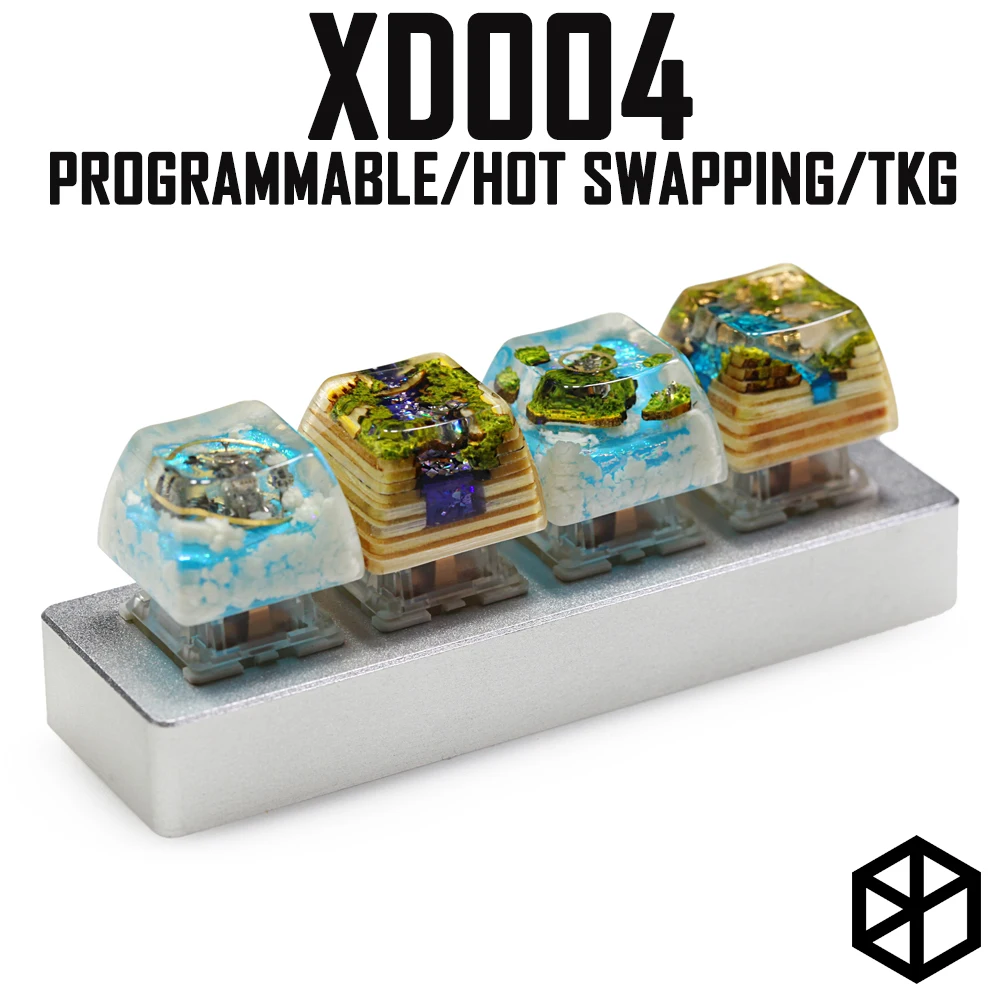
|
||||
|
||||
Keyboard Maintainer: QMK Community
|
||||
Hardware Supported: XD004 PCB v1.0
|
||||
Hardware Availability: [KPRepublic](https://kprepublic.com/products/xd004-xiudi-4-custom-mechanical-keyboard-4-keys-switch-leds-pcb-programmed-hot-swappable-macro-key-silver-case-micro-port)
|
||||
* Keyboard Maintainer: QMK Community
|
||||
* Hardware Supported: XD004 PCB v1.0
|
||||
* Hardware Availability: [KPRepublic](https://kprepublic.com/products/xd004-xiudi-4-custom-mechanical-keyboard-4-keys-switch-leds-pcb-programmed-hot-swappable-macro-key-silver-case-micro-port)
|
||||
|
||||
To put this board in DFU (firmware update) mode, bridge the last two pins (#5 & 6) of the 6-pin "J2" header on the opposite edge of the board to the USB port"
|
||||
```
|
||||
|
|
@ -23,8 +22,12 @@ To put this board in DFU (firmware update) mode, bridge the last two pins (#5 &
|
|||
----+
|
||||
```
|
||||
|
||||
To build with a default keymap (not useful at all, have a look at other keymaps):
|
||||
Make example for this keyboard (after setting up your build environment):
|
||||
|
||||
```make xd004/v1:default```
|
||||
make xiudi/xd004/v1:default
|
||||
|
||||
Flashing example for this keyboard:
|
||||
|
||||
make xiudi/xd004/v1:default:flash
|
||||
|
||||
See the [build environment setup](https://docs.qmk.fm/#/getting_started_build_tools) and the [make instructions](https://docs.qmk.fm/#/getting_started_make_guide) for more information. Brand new to QMK? Start with our [Complete Newbs Guide](https://docs.qmk.fm/#/newbs).
|
||||
|
|
|
|||
|
|
@ -11,7 +11,7 @@ Compact 60% with arrows.
|
|||
|
||||
Make example for this keyboard (after setting up your build environment):
|
||||
|
||||
make xd60/rev2:default # rev2
|
||||
make xd60/rev3:default # rev3
|
||||
make xiudi/xd60/rev2:default # rev2
|
||||
make xiudi/xd60/rev3:default # rev3
|
||||
|
||||
See the [build environment setup](https://docs.qmk.fm/#/getting_started_build_tools) and the [make instructions](https://docs.qmk.fm/#/getting_started_make_guide) for more information. Brand new to QMK? Start with our [Complete Newbs Guide](https://docs.qmk.fm/#/newbs).
|
||||
|
|
|
|||
|
|
@ -12,8 +12,8 @@
|
|||
|
||||
Make example for this keyboard (after setting up your build environment):
|
||||
|
||||
make xd68:default
|
||||
make xd68:default_iso # default ISO UK layout
|
||||
make xiudi/xd68:default
|
||||
make xiudi/xd68:default_iso # default ISO UK layout
|
||||
|
||||
## Layouts
|
||||
|
||||
|
|
|
|||
Some files were not shown because too many files have changed in this diff Show more
Loading…
Reference in a new issue