Merge branch 'master' into docs
This commit is contained in:
 skullydazed
 GitHub
commit
ecd3dbf085
149 changed files with 2557 additions and 1359 deletions
|
|
@ -34,7 +34,7 @@ after_success:
|
|||
notifications:
|
||||
webhooks:
|
||||
urls:
|
||||
- https://webhooks.gitter.im/e/cca31de3d44b9adb617b
|
||||
on_success: change # options: [always|never|change] default: always
|
||||
- https://webhooks.gitter.im/e/afce403d65f143dfac09
|
||||
on_success: always # options: [always|never|change] default: always
|
||||
on_failure: always # options: [always|never|change] default: always
|
||||
on_start: never # options: [always|never|change] default: always
|
||||
|
|
@ -43,7 +43,7 @@ A macro can include the following commands:
|
|||
|
||||
## Sending strings
|
||||
|
||||
Sometimes you just want a key to type out words or phrases. For the most common situations we've provided `SEND_STRING()`, which will type out your string for you instead of having to build a `MACRO()`. Right now it assumes a US keymap with a QWERTY layout, so if you are using something else it may not behave as you expect.
|
||||
Sometimes you just want a key to type out words or phrases. For the most common situations we've provided `SEND_STRING()`, which will type out your string for you instead of having to build a `MACRO()`.
|
||||
|
||||
For example:
|
||||
|
||||
|
|
@ -60,6 +60,12 @@ const macro_t *action_get_macro(keyrecord_t *record, uint8_t id, uint8_t opt) {
|
|||
};
|
||||
```
|
||||
|
||||
By default, it assumes a US keymap with a QWERTY layout; if you want to change that (e.g. if your OS uses software Colemak), include this somewhere in your keymap:
|
||||
|
||||
```
|
||||
#include <sendstring_colemak.h>
|
||||
```
|
||||
|
||||
## Mapping a Macro to a key
|
||||
|
||||
Use the `M()` function within your `KEYMAP()` to call a macro. For example, here is the keymap for a 2-key keyboard:
|
||||
|
|
|
|||
|
|
@ -1,5 +1,6 @@
|
|||
# Mousekeys
|
||||
|
||||
|
||||
Mousekeys is a feature that allows you to emulate a mouse using your keyboard. You can move the pointer around, click up to 5 buttons, and even scroll in all 4 directions. QMK uses the same algorithm as the X Window System MouseKeysAccel feature. You can read more about it [on Wikipedia](https://en.wikipedia.org/wiki/Mouse_keys).
|
||||
|
||||
## Adding Mousekeys To a Keymap
|
||||
|
|
@ -54,6 +55,7 @@ The default speed for controlling the mouse with the keyboard is intentionaly sl
|
|||
#define MOUSEKEY_WHEEL_TIME_TO_MAX 40
|
||||
```
|
||||
|
||||
|
||||
### `MOUSEKEY_DELAY`
|
||||
|
||||
When one of the mouse movement buttons is pressed this setting is used to define the delay between that button press and the mouse cursor moving. Some people find that small movements are impossible if this setting is too low, while settings that are too high feel sluggish.
|
||||
|
|
@ -76,4 +78,4 @@ The top speed for scrolling movements.
|
|||
|
||||
### `MOUSEKEY_WHEEL_TIME_TO_MAX`
|
||||
|
||||
How long you want to hold down a scroll key for until `MOUSEKEY_WHEEL_MAX_SPEED` is reached. This controls how quickling your scrolling will accelerate.
|
||||
How long you want to hold down a scroll key for until `MOUSEKEY_WHEEL_MAX_SPEED` is reached. This controls how quickling your scrolling will accelerate.
|
||||
|
|
@ -55,12 +55,12 @@ OPT_DEFS += -DBOOTLOADER_SIZE=4096
|
|||
|
||||
|
||||
# Build Options
|
||||
# comment out to disable the options.
|
||||
# change to no to disable the options.
|
||||
#
|
||||
BOOTMAGIC_ENABLE ?= yes # Virtual DIP switch configuration(+1000)
|
||||
MOUSEKEY_ENABLE ?= yes # Mouse keys(+4700)
|
||||
EXTRAKEY_ENABLE ?= yes # Audio control and System control(+450)
|
||||
CONSOLE_ENABLE ?= yes # Console for debug(+400)
|
||||
COMMAND_ENABLE ?= yes # Commands for debug and configuration
|
||||
#SLEEP_LED_ENABLE = yes # Breathing sleep LED during USB suspend
|
||||
#NKRO_ENABLE = yes # USB Nkey Rollover - not yet supported in LUFA
|
||||
BOOTMAGIC_ENABLE = yes # Virtual DIP switch configuration(+1000)
|
||||
MOUSEKEY_ENABLE = yes # Mouse keys(+4700)
|
||||
EXTRAKEY_ENABLE = yes # Audio control and System control(+450)
|
||||
CONSOLE_ENABLE = yes # Console for debug(+400)
|
||||
COMMAND_ENABLE = yes # Commands for debug and configuration
|
||||
SLEEP_LED_ENABLE = no # Breathing sleep LED during USB suspend
|
||||
NKRO_ENABLE = no # USB Nkey Rollover - not yet supported in LUFA
|
||||
|
|
|
|||
|
|
@ -52,15 +52,15 @@ OPT_DEFS += -DBOOTLOADER_SIZE=4096
|
|||
# Build Options
|
||||
# comment out to disable the options.
|
||||
#
|
||||
BOOTMAGIC_ENABLE ?= no # Virtual DIP switch configuration(+1000)
|
||||
MOUSEKEY_ENABLE ?= no # Mouse keys(+4700)
|
||||
EXTRAKEY_ENABLE ?= yes # Audio control and System control(+450)
|
||||
CONSOLE_ENABLE ?= yes # Console for debug(+400)
|
||||
COMMAND_ENABLE ?= yes # Commands for debug and configuration
|
||||
NKRO_ENABLE ?= yes # USB Nkey Rollover - if this doesn't work, see here: https://github.com/tmk/tmk_keyboard/wiki/FAQ#nkro-doesnt-work
|
||||
RGBLIGHT_ENABLE ?= yes # Enable keyboard underlight functionality (+4870)
|
||||
BACKLIGHT_ENABLE ?= yes # Enable keyboard backlight functionality (+1150)
|
||||
MIDI_ENABLE ?= no # MIDI controls
|
||||
AUDIO_ENABLE ?= no
|
||||
UNICODE_ENABLE ?= no # Unicode
|
||||
BLUETOOTH_ENABLE ?= no # Enable Bluetooth with the Adafruit EZ-Key HID
|
||||
BOOTMAGIC_ENABLE = no # Virtual DIP switch configuration(+1000)
|
||||
MOUSEKEY_ENABLE = no # Mouse keys(+4700)
|
||||
EXTRAKEY_ENABLE = yes # Audio control and System control(+450)
|
||||
CONSOLE_ENABLE = yes # Console for debug(+400)
|
||||
COMMAND_ENABLE = yes # Commands for debug and configuration
|
||||
NKRO_ENABLE = yes # USB Nkey Rollover - if this doesn't work, see here: https://github.com/tmk/tmk_keyboard/wiki/FAQ#nkro-doesnt-work
|
||||
RGBLIGHT_ENABLE = yes # Enable keyboard underlight functionality (+4870)
|
||||
BACKLIGHT_ENABLE = yes # Enable keyboard backlight functionality (+1150)
|
||||
MIDI_ENABLE = no # MIDI controls
|
||||
AUDIO_ENABLE = no
|
||||
UNICODE_ENABLE = no # Unicode
|
||||
BLUETOOTH_ENABLE = no # Enable Bluetooth with the Adafruit EZ-Key HID
|
||||
|
|
|
|||
|
|
@ -52,15 +52,15 @@ OPT_DEFS += -DBOOTLOADER_SIZE=4096
|
|||
# Build Options
|
||||
# comment out to disable the options.
|
||||
#
|
||||
BOOTMAGIC_ENABLE ?= no # Virtual DIP switch configuration(+1000)
|
||||
MOUSEKEY_ENABLE ?= no # Mouse keys(+4700)
|
||||
EXTRAKEY_ENABLE ?= yes # Audio control and System control(+450)
|
||||
CONSOLE_ENABLE ?= yes # Console for debug(+400)
|
||||
COMMAND_ENABLE ?= yes # Commands for debug and configuration
|
||||
NKRO_ENABLE ?= yes # USB Nkey Rollover - if this doesn't work, see here: https://github.com/tmk/tmk_keyboard/wiki/FAQ#nkro-doesnt-work
|
||||
RGBLIGHT_ENABLE ?= no # Enable keyboard underlight functionality (+4870)
|
||||
BACKLIGHT_ENABLE ?= yes # Enable keyboard backlight functionality (+1150)
|
||||
MIDI_ENABLE ?= no # MIDI controls
|
||||
AUDIO_ENABLE ?= no
|
||||
UNICODE_ENABLE ?= no # Unicode
|
||||
BLUETOOTH_ENABLE ?= no # Enable Bluetooth with the Adafruit EZ-Key HID
|
||||
BOOTMAGIC_ENABLE = no # Virtual DIP switch configuration(+1000)
|
||||
MOUSEKEY_ENABLE = no # Mouse keys(+4700)
|
||||
EXTRAKEY_ENABLE = yes # Audio control and System control(+450)
|
||||
CONSOLE_ENABLE = yes # Console for debug(+400)
|
||||
COMMAND_ENABLE = yes # Commands for debug and configuration
|
||||
NKRO_ENABLE = yes # USB Nkey Rollover - if this doesn't work, see here: https://github.com/tmk/tmk_keyboard/wiki/FAQ#nkro-doesnt-work
|
||||
RGBLIGHT_ENABLE = no # Enable keyboard underlight functionality (+4870)
|
||||
BACKLIGHT_ENABLE = yes # Enable keyboard backlight functionality (+1150)
|
||||
MIDI_ENABLE = no # MIDI controls
|
||||
AUDIO_ENABLE = no
|
||||
UNICODE_ENABLE = no # Unicode
|
||||
BLUETOOTH_ENABLE = no # Enable Bluetooth with the Adafruit EZ-Key HID
|
||||
|
|
|
|||
|
|
@ -52,18 +52,18 @@ OPT_DEFS += -DBOOTLOADER_SIZE=4096
|
|||
# change to "no" to disable the options, or define them in the Makefile in
|
||||
# the appropriate keymap folder that will get included automatically
|
||||
#
|
||||
BOOTMAGIC_ENABLE ?= no # Virtual DIP switch configuration(+1000)
|
||||
MOUSEKEY_ENABLE ?= yes # Mouse keys(+4700)
|
||||
EXTRAKEY_ENABLE ?= yes # Audio control and System control(+450)
|
||||
CONSOLE_ENABLE ?= no # Console for debug(+400)
|
||||
COMMAND_ENABLE ?= yes # Commands for debug and configuration
|
||||
NKRO_ENABLE ?= no # Nkey Rollover - if this doesn't work, see here: https://github.com/tmk/tmk_keyboard/wiki/FAQ#nkro-doesnt-work
|
||||
BACKLIGHT_ENABLE ?= yes # Enable keyboard backlight functionality
|
||||
MIDI_ENABLE ?= no # MIDI controls
|
||||
AUDIO_ENABLE ?= no # Audio output on port C6
|
||||
UNICODE_ENABLE ?= no # Unicode
|
||||
BLUETOOTH_ENABLE ?= no # Enable Bluetooth with the Adafruit EZ-Key HID
|
||||
RGBLIGHT_ENABLE ?= no # Enable WS2812 RGB underlight. Do not enable this with audio at the same time.
|
||||
BOOTMAGIC_ENABLE = no # Virtual DIP switch configuration(+1000)
|
||||
MOUSEKEY_ENABLE = yes # Mouse keys(+4700)
|
||||
EXTRAKEY_ENABLE = yes # Audio control and System control(+450)
|
||||
CONSOLE_ENABLE = no # Console for debug(+400)
|
||||
COMMAND_ENABLE = yes # Commands for debug and configuration
|
||||
NKRO_ENABLE = no # Nkey Rollover - if this doesn't work, see here: https://github.com/tmk/tmk_keyboard/wiki/FAQ#nkro-doesnt-work
|
||||
BACKLIGHT_ENABLE = yes # Enable keyboard backlight functionality
|
||||
MIDI_ENABLE = no # MIDI controls
|
||||
AUDIO_ENABLE = no # Audio output on port C6
|
||||
UNICODE_ENABLE = no # Unicode
|
||||
BLUETOOTH_ENABLE = no # Enable Bluetooth with the Adafruit EZ-Key HID
|
||||
RGBLIGHT_ENABLE = no # Enable WS2812 RGB underlight. Do not enable this with audio at the same time.
|
||||
|
||||
# Do not enable SLEEP_LED_ENABLE. it uses the same timer as BACKLIGHT_ENABLE
|
||||
SLEEP_LED_ENABLE ?= no # Breathing sleep LED during USB suspend
|
||||
SLEEP_LED_ENABLE = no # Breathing sleep LED during USB suspend
|
||||
|
|
@ -64,19 +64,19 @@ OPT_DEFS += -DBOOTLOADER_SIZE=4096
|
|||
# comment out to disable the options.
|
||||
#
|
||||
#BOOTMAGIC_ENABLE = yes # Virtual DIP switch configuration(+1000)
|
||||
MOUSEKEY_ENABLE ?= yes # Mouse keys(+4700)
|
||||
EXTRAKEY_ENABLE ?= yes # Audio control and System control(+450)
|
||||
CONSOLE_ENABLE ?= yes # Console for debug(+400)
|
||||
COMMAND_ENABLE ?= yes # Commands for debug and configuration
|
||||
MOUSEKEY_ENABLE = yes # Mouse keys(+4700)
|
||||
EXTRAKEY_ENABLE = yes # Audio control and System control(+450)
|
||||
CONSOLE_ENABLE = yes # Console for debug(+400)
|
||||
COMMAND_ENABLE = yes # Commands for debug and configuration
|
||||
# Do not enable SLEEP_LED_ENABLE. it uses the same timer as BACKLIGHT_ENABLE
|
||||
# SLEEP_LED_ENABLE ?= yes # Breathing sleep LED during USB suspend
|
||||
NKRO_ENABLE ?= yes # USB Nkey Rollover - not yet supported in LUFA
|
||||
# BACKLIGHT_ENABLE ?= yes # Enable keyboard backlight functionality
|
||||
# MIDI_ENABLE ?= YES # MIDI controls
|
||||
UNICODE_ENABLE ?= YES # Unicode
|
||||
# BLUETOOTH_ENABLE ?= yes # Enable Bluetooth with the Adafruit EZ-Key HID
|
||||
# SLEEP_LED_ENABLE = yes # Breathing sleep LED during USB suspend
|
||||
NKRO_ENABLE = yes # USB Nkey Rollover - not yet supported in LUFA
|
||||
# BACKLIGHT_ENABLE = yes # Enable keyboard backlight functionality
|
||||
# MIDI_ENABLE = YES # MIDI controls
|
||||
UNICODE_ENABLE = YES # Unicode
|
||||
# BLUETOOTH_ENABLE = yes # Enable Bluetooth with the Adafruit EZ-Key HID
|
||||
|
||||
USB ?= /dev/cu.usbmodem1411
|
||||
USB = /dev/cu.usbmodem1411
|
||||
|
||||
upload: build
|
||||
$(ATREUS_UPLOAD_COMMAND)
|
||||
|
|
|
|||
|
|
@ -51,16 +51,16 @@ OPT_DEFS += -DBOOTLOADER_SIZE=4096
|
|||
# change to "no" to disable the options, or define them in the Makefile in
|
||||
# the appropriate keymap folder that will get included automatically
|
||||
#
|
||||
BOOTMAGIC_ENABLE ?= no # Virtual DIP switch configuration(+1000)
|
||||
MOUSEKEY_ENABLE ?= yes # Mouse keys(+4700)
|
||||
EXTRAKEY_ENABLE ?= yes # Audio control and System control(+450)
|
||||
CONSOLE_ENABLE ?= yes # Console for debug(+400)
|
||||
COMMAND_ENABLE ?= yes # Commands for debug and configuration
|
||||
NKRO_ENABLE ?= no # Nkey Rollover - if this doesn't work, see here: https://github.com/tmk/tmk_keyboard/wiki/FAQ#nkro-doesnt-work
|
||||
#BACKLIGHT_ENABLE ?= no # Enable keyboard backlight functionality
|
||||
#MIDI_ENABLE ?= no # MIDI controls
|
||||
UNICODE_ENABLE ?= yes # Unicode
|
||||
#BLUETOOTH_ENABLE ?= yes # Enable Bluetooth with the Adafruit EZ-Key HID
|
||||
BOOTMAGIC_ENABLE = no # Virtual DIP switch configuration(+1000)
|
||||
MOUSEKEY_ENABLE = yes # Mouse keys(+4700)
|
||||
EXTRAKEY_ENABLE = yes # Audio control and System control(+450)
|
||||
CONSOLE_ENABLE = yes # Console for debug(+400)
|
||||
COMMAND_ENABLE = yes # Commands for debug and configuration
|
||||
NKRO_ENABLE = no # Nkey Rollover - if this doesn't work, see here: https://github.com/tmk/tmk_keyboard/wiki/FAQ#nkro-doesnt-work
|
||||
#BACKLIGHT_ENABLE = no # Enable keyboard backlight functionality
|
||||
#MIDI_ENABLE = no # MIDI controls
|
||||
UNICODE_ENABLE = yes # Unicode
|
||||
#BLUETOOTH_ENABLE = yes # Enable Bluetooth with the Adafruit EZ-Key HID
|
||||
|
||||
# Do not enable SLEEP_LED_ENABLE. it uses the same timer as BACKLIGHT_ENABLE
|
||||
SLEEP_LED_ENABLE ?= no # Breathing sleep LED during USB suspend
|
||||
SLEEP_LED_ENABLE = no # Breathing sleep LED during USB suspend
|
||||
|
|
|
|||
|
|
@ -53,15 +53,15 @@ OPT_DEFS += -DBOOTLOADER_SIZE=512
|
|||
# Build Options
|
||||
# comment out to disable the options.
|
||||
#
|
||||
BOOTMAGIC_ENABLE ?= yes # Virtual DIP switch configuration(+1000)
|
||||
MOUSEKEY_ENABLE ?= yes # Mouse keys(+4700)
|
||||
EXTRAKEY_ENABLE ?= yes # Audio control and System control(+450)
|
||||
CONSOLE_ENABLE ?= yes # Console for debug(+400)
|
||||
COMMAND_ENABLE ?= yes # Commands for debug and configuration
|
||||
BOOTMAGIC_ENABLE = yes # Virtual DIP switch configuration(+1000)
|
||||
MOUSEKEY_ENABLE = yes # Mouse keys(+4700)
|
||||
EXTRAKEY_ENABLE = yes # Audio control and System control(+450)
|
||||
CONSOLE_ENABLE = yes # Console for debug(+400)
|
||||
COMMAND_ENABLE = yes # Commands for debug and configuration
|
||||
# Do not enable SLEEP_LED_ENABLE. it uses the same timer as BACKLIGHT_ENABLE
|
||||
# SLEEP_LED_ENABLE ?= yes # Breathing sleep LED during USB suspend
|
||||
# NKRO_ENABLE ?= yes # USB Nkey Rollover - if this doesn't work, see here: https://github.com/tmk/tmk_keyboard/wiki/FAQ#nkro-doesnt-work
|
||||
# BACKLIGHT_ENABLE ?= yes # Enable keyboard backlight functionality
|
||||
# MIDI_ENABLE ?= YES # MIDI controls
|
||||
# UNICODE_ENABLE ?= YES # Unicode
|
||||
# BLUETOOTH_ENABLE ?= yes # Enable Bluetooth with the Adafruit EZ-Key HID
|
||||
# SLEEP_LED_ENABLE = yes # Breathing sleep LED during USB suspend
|
||||
# NKRO_ENABLE = yes # USB Nkey Rollover - if this doesn't work, see here: https://github.com/tmk/tmk_keyboard/wiki/FAQ#nkro-doesnt-work
|
||||
# BACKLIGHT_ENABLE = yes # Enable keyboard backlight functionality
|
||||
# MIDI_ENABLE = YES # MIDI controls
|
||||
# UNICODE_ENABLE = YES # Unicode
|
||||
# BLUETOOTH_ENABLE = yes # Enable Bluetooth with the Adafruit EZ-Key HID
|
||||
|
|
|
|||
|
|
@ -1,8 +1,8 @@
|
|||
#BOOTMAGIC_ENABLE = yes # Virtual DIP switch configuration
|
||||
MOUSEKEY_ENABLE ?= yes # Mouse keys
|
||||
EXTRAKEY_ENABLE ?= yes # Audio control and System control
|
||||
CONSOLE_ENABLE ?= yes # Console for debug
|
||||
COMMAND_ENABLE ?= yes # Commands for debug and configuration
|
||||
SLEEP_LED_ENABLE ?= yes # Breathing sleep LED during USB suspend
|
||||
NKRO_ENABLE ?= yes # USB Nkey Rollover
|
||||
CUSTOM_MATRIX ?= yes # Custom matrix file
|
||||
MOUSEKEY_ENABLE = yes # Mouse keys
|
||||
EXTRAKEY_ENABLE = yes # Audio control and System control
|
||||
CONSOLE_ENABLE = yes # Console for debug
|
||||
COMMAND_ENABLE = yes # Commands for debug and configuration
|
||||
SLEEP_LED_ENABLE = yes # Breathing sleep LED during USB suspend
|
||||
NKRO_ENABLE = yes # USB Nkey Rollover
|
||||
CUSTOM_MATRIX = yes # Custom matrix file
|
||||
|
|
@ -26,13 +26,8 @@
|
|||
/* override number of MIDI tone keycodes (each octave adds 12 keycodes and allocates 12 bytes) */
|
||||
#define MIDI_TONE_KEYCODE_OCTAVES 2
|
||||
|
||||
/* Disabling rollover allows you to use the opposite shift key to cancel the space cadet state in the event
|
||||
of an erroneous press instead of emitting a pair of parentheses when the keys are released.
|
||||
*/
|
||||
#define DISABLE_SPACE_CADET_ROLLOVER
|
||||
|
||||
/*
|
||||
Setting the Space Cadet Parens for German layout
|
||||
Setting the modified Space Cadet Parens for German layout
|
||||
|
||||
Default is
|
||||
#define LSPO_KEY KC_9
|
||||
|
|
@ -40,5 +35,6 @@
|
|||
*/
|
||||
#define LSPO_KEY KC_8
|
||||
#define RSPC_KEY KC_9
|
||||
#define PERMISSIVE_HOLD
|
||||
|
||||
#endif
|
||||
|
|
|
|||
|
|
@ -4,8 +4,6 @@
|
|||
#define GRAVE_MODS (MOD_BIT(KC_LSHIFT)|MOD_BIT(KC_RSHIFT)|MOD_BIT(KC_LGUI)|MOD_BIT(KC_RGUI)|MOD_BIT(KC_LALT)|MOD_BIT(KC_RALT))
|
||||
#define _______ KC_TRNS
|
||||
#define xxxxxxx KC_NO
|
||||
#define HPR_TAB ALL_T(KC_TAB)
|
||||
#define CTL_ESC CTL_T(KC_ESC)
|
||||
|
||||
// Each layer gets a name for readability, which is then used in the keymap matrix below.
|
||||
// The underscores don't mean anything - you can have a layer called STUFF or any other name.
|
||||
|
|
@ -23,14 +21,34 @@
|
|||
#define TO_MIDI _______
|
||||
#endif
|
||||
|
||||
// go back to base layer
|
||||
#define TO_BASE TO(_BL)
|
||||
|
||||
// switch to function layer while helde
|
||||
#define MO_FUNC MO(_FL)
|
||||
|
||||
// switch to media layer while held
|
||||
#define MEDIA MO(_ME)
|
||||
|
||||
// switch to Control layer while helde
|
||||
#define MO_CTL MO(_CL)
|
||||
|
||||
// switch to mouse layer if held, else space
|
||||
#define L_MOUSE LT(_ML, KC_SPC)
|
||||
|
||||
// Function key when held, else ESC
|
||||
#define ESC_FUN LT(_FL, KC_ESC)
|
||||
|
||||
// Hyper (CTRL+ALT+SHIFT+SUPER) when held, TAB when tapped
|
||||
#define HPR_TAB ALL_T(KC_TAB)
|
||||
|
||||
// CTRL when held, ESC when tapped
|
||||
#define CTL_ESC CTL_T(KC_ESC)
|
||||
|
||||
// ESC/Grave mode
|
||||
#define ESC_GRV F(0)
|
||||
|
||||
// Reset RGB mode to layer signalling
|
||||
#define RGB_RST F(1)
|
||||
|
||||
const uint16_t PROGMEM keymaps[][MATRIX_ROWS][MATRIX_COLS] = {
|
||||
|
|
@ -39,15 +57,15 @@ const uint16_t PROGMEM keymaps[][MATRIX_ROWS][MATRIX_COLS] = {
|
|||
ESC_GRV, KC_1, KC_2, KC_3, KC_4, KC_5, KC_6, KC_7, KC_8, KC_9, KC_0, KC_MINS, KC_EQL, _______, KC_BSPC, KC_INS, \
|
||||
HPR_TAB, KC_Q, KC_W, KC_E, KC_R, KC_T, KC_Y, KC_U, KC_I, KC_O, KC_P, KC_LBRC, KC_RBRC, KC_BSLS, KC_DEL, \
|
||||
ESC_FUN, KC_A, KC_S, KC_D, KC_F, KC_G, KC_H, KC_J, KC_K, KC_L, KC_SCLN, KC_QUOT, KC_NUHS, KC_ENT, \
|
||||
KC_LSPO, KC_NUBS, KC_Z, KC_X, KC_C, KC_V, KC_B, KC_N, KC_M, KC_COMM, KC_DOT, KC_SLSH, _______, KC_RSPC, KC_UP, \
|
||||
KC_LSFT, KC_NUBS, KC_Z, KC_X, KC_C, KC_V, KC_B, KC_N, KC_M, KC_COMM, KC_DOT, KC_SLSH, _______, KC_RSFT, KC_UP, \
|
||||
KC_LCTL, KC_LGUI, KC_LALT,_______, L_MOUSE, L_MOUSE, _______, KC_RALT, KC_RCTL, MO_FUNC, KC_LEFT, KC_DOWN, KC_RGHT),
|
||||
|
||||
/* Keymap _FL: Function Layer */
|
||||
/* Keymap _FL: Function layer */
|
||||
[_FL] = KEYMAP(
|
||||
KC_GRV, KC_F1, KC_F2, KC_F3, KC_F4, KC_F5, KC_F6, KC_F7, KC_F8, KC_F9, KC_F10, KC_F11, KC_F12, _______, _______, BL_STEP, \
|
||||
_______, _______, _______, _______, _______, _______, _______, _______, KC_PSCR, _______, KC_PAUS, _______, _______, _______, _______, \
|
||||
_______, _______, MO_CTL, _______, _______, _______, KC_LEFT, KC_DOWN, KC_UP, KC_RGHT, _______, _______, _______, _______, \
|
||||
_______, _______, _______, _______, _______, _______, _______, _______, MEDIA, _______, _______, TO_MIDI, _______, _______, KC_PGUP, \
|
||||
KC_LSPO, _______, _______, _______, _______, _______, _______, _______, MEDIA, _______, _______, TO_MIDI, _______, KC_RSPC, KC_PGUP, \
|
||||
_______, _______, _______, _______, _______, _______, _______, _______, _______, MO_FUNC, KC_HOME, KC_PGDN, KC_END),
|
||||
|
||||
/* Keymap _ME: Media layer */
|
||||
|
|
@ -70,9 +88,9 @@ const uint16_t PROGMEM keymaps[][MATRIX_ROWS][MATRIX_COLS] = {
|
|||
[_ML] = KEYMAP(
|
||||
_______, _______, _______, _______, _______, _______, _______, _______, _______, _______, _______, _______, _______, _______, _______, _______, \
|
||||
_______, _______, _______, _______, _______, _______, _______, _______, _______, _______, _______, _______, _______, _______, _______, \
|
||||
_______, _______, KC_BTN3, KC_BTN2, KC_BTN1, _______, KC_MS_L, KC_MS_D, KC_MS_U, KC_MS_R, _______, _______, _______, _______, \
|
||||
_______, _______, KC_BTN2, KC_BTN3, KC_BTN1, _______, KC_MS_L, KC_MS_D, KC_MS_U, KC_MS_R, _______, _______, _______, _______, \
|
||||
_______, _______, _______, _______, _______, _______, _______, _______, _______, _______, _______, _______, _______, _______, KC_MS_U, \
|
||||
_______, _______, _______, _______, L_MOUSE, L_MOUSE, _______, KC_BTN1, KC_BTN2, KC_BTN3, KC_MS_L, KC_MS_D, KC_MS_R),
|
||||
_______, _______, _______, _______, L_MOUSE, L_MOUSE, _______, KC_BTN1, KC_BTN3, KC_BTN2, KC_MS_L, KC_MS_D, KC_MS_R),
|
||||
|
||||
#if defined(MIDI_ENABLE) && defined(MIDI_ADVANCED)
|
||||
/* Keymap _MI: MIDI layer (Advanced)*/
|
||||
|
|
@ -179,6 +197,47 @@ void clueboard_set_led(uint8_t id, uint8_t val) {
|
|||
}
|
||||
};
|
||||
|
||||
const uint16_t oct_hues[10] = {
|
||||
0,
|
||||
30,
|
||||
60,
|
||||
90,
|
||||
120,
|
||||
150,
|
||||
180,
|
||||
210,
|
||||
240,
|
||||
300
|
||||
};
|
||||
|
||||
#define MAX_OCT 9
|
||||
|
||||
void clueboard_set_midi_led(uint8_t base_oct, uint8_t val)
|
||||
{
|
||||
uint8_t sat = 255;
|
||||
|
||||
for (uint8_t i = 0; i < RGBLED_NUM; i++) {
|
||||
sethsv(oct_hues[base_oct], sat, val, (LED_TYPE *)&led[i]);
|
||||
}
|
||||
|
||||
uint8_t next_oct = base_oct < MAX_OCT ? base_oct + 1 : base_oct;
|
||||
|
||||
uint16_t next_hue = base_oct < MAX_OCT ? oct_hues[next_oct] : 0;
|
||||
uint8_t next_val = base_oct < MAX_OCT ? val : 0;
|
||||
uint8_t next_sat = base_oct < MAX_OCT ? sat : 0;
|
||||
|
||||
|
||||
for (uint8_t i = 0; i < 3; i++) {
|
||||
sethsv(next_hue, next_sat, next_val, (LED_TYPE *)&led[i]);
|
||||
}
|
||||
|
||||
for (uint8_t i = 11; i < 14; i++) {
|
||||
sethsv(next_hue, next_sat, next_val, (LED_TYPE *)&led[i]);
|
||||
}
|
||||
|
||||
rgblight_set();
|
||||
}
|
||||
|
||||
void matrix_scan_user(void) {
|
||||
rgblight_config_t rgblight_config;
|
||||
rgblight_config.raw = eeconfig_read_rgblight();
|
||||
|
|
@ -197,10 +256,10 @@ void matrix_scan_user(void) {
|
|||
clueboard_set_led(LAYER_FUNCTION, val);
|
||||
}
|
||||
} else if (layer & (1<<_ML)) {
|
||||
clueboard_set_led(LAYER_MOUSE, val);
|
||||
clueboard_set_led(LAYER_MOUSE, val);
|
||||
#if defined(MIDI_ENABLE)
|
||||
} else if (layer & (1<<_MI)) {
|
||||
clueboard_set_led(LAYER_MIDI, val);
|
||||
clueboard_set_midi_led(midi_config.octave, val);
|
||||
#endif
|
||||
} else {
|
||||
clueboard_set_led(LAYER_BASE, val);
|
||||
|
|
|
|||
|
|
@ -2,23 +2,42 @@
|
|||
|
||||
[Keyboard Layout Editor File]
|
||||
|
||||

|
||||

|
||||
My ClueBoard Layout as of 2017/06/30
|
||||
|
||||
|
||||
This layout is a combination of the `mouse_keys` and the `win_optimized` layouts.
|
||||
This layout is optimized for an ISO layout.
|
||||
The CapsLock is disabled and works as ESC when tapped and FN when held.
|
||||
The `TAB` key works as `TAB` when tapped, and [HYPER] (`CTRL` + `ALT` + `SHIFT` + `CMD`) when held.
|
||||
|
||||
It adds a mouse layer. When you hold down the spacebar the arrow keys
|
||||
will move your mouse cursor. You can click using the 3 mods to the left of the
|
||||
arrow keys, or the 3 keys under your primary fingers on the home row.
|
||||
## Mouse Layer
|
||||
|
||||
When you hold down the spacebar the arrow keys will move your mouse cursor.
|
||||
You can click using the 3 mods to the left of the arrow keys, or the 3 keys under your primary fingers on the home row.
|
||||
The Left, Down, Up and Right for the mouse movement are also VIM-Like on the HJKL keys
|
||||
|
||||
There is also a MIDI layer included.
|
||||
## MIDI layer
|
||||
|
||||
The CapsLock is disabled and works as Escape when tapped and Fn when Hold.
|
||||
The Tab key works as Tab when tapped, and [Hyper] (Ctrl + Alt + Shift + Cmd) when hold
|
||||
The Shift-Keys are configured as [Space Cadet Shift Parentheses]
|
||||
The MIDI layer is permanently enabled by pressing `FN` + `/`.
|
||||
It can be exited with the `ESC`-Key
|
||||
|
||||
There is also a separate media layer with Volume/Play controls
|
||||
## Space Cadet(ish) Shift Parentheses
|
||||
|
||||
If the function layer is active, the `SHIFT`-Keys are configured like the [Space Cadet Shift Parentheses]
|
||||
as opened (left `SHIFT`) and closed (right `SHIFT`) parentheses if tapped and `SHIFT` if held.
|
||||
|
||||
## Media layer
|
||||
|
||||
The media layer with Volume/Play controls, can be accessed via `FN` + `m`
|
||||
|
||||
## Control layer
|
||||
|
||||
The control layer is accessed via `FN` + `s`.
|
||||
Here one can control the behavior of the RGB underlight.
|
||||
`FN` + `s` + `1` resets the RGB underlight to the Layer signalling mode
|
||||
|
||||
## Layer signalling through underlight
|
||||
|
||||
The different layers are signalled throug setting of the underlight:
|
||||
|
||||
|
|
@ -29,6 +48,6 @@ The different layers are signalled throug setting of the underlight:
|
|||
- Control layer: Red
|
||||
- Midi layer: Purple
|
||||
|
||||
[Hyper]: http://brettterpstra.com/2012/12/08/a-useful-caps-lock-key/
|
||||
[HYPER]: http://brettterpstra.com/2012/12/08/a-useful-caps-lock-key/
|
||||
[Space Cadet Shift Parentheses]: http://stevelosh.com/blog/2012/10/a-modern-space-cadet/#shift-parentheses
|
||||
[Keyboard Layout Editor File]: http://www.keyboard-layout-editor.com/#/gists/f869b8789242a712e0f46eabbd550056
|
||||
|
|
|
|||
|
|
@ -1,97 +1,17 @@
|
|||
Clueboard keyboard firmware
|
||||
======================
|
||||
# Clueboard 66%
|
||||
|
||||
DIY/Assembled compact 66% keyboard by [Clueboard](http://clueboard.co).
|
||||

|
||||
|
||||
For the full Quantum Mechanical Keyboard feature list, see [the parent readme.md](/readme.md).
|
||||
A fully customizable 66% keyboard.
|
||||
|
||||
## First Time Setup
|
||||
* Keyboard Maintainer: [Zach White](https://github.com/skullydazed)
|
||||
* Hardware Supported: Clueboard 66% PCB
|
||||
* rev1 (1.0)
|
||||
* rev2 (2.0, 2.0.1, 2.1, 2.5, 2.5.1, 2.6)
|
||||
* Hardware Availability: [clueboard.co](https://clueboard.co/)
|
||||
|
||||
Download or clone the whole firmware and navigate to the keyboards/clueboard directory. Once your dev env is setup, you'll be able to generate the default .hex:
|
||||
Make example for this keyboard (after setting up your build environment):
|
||||
|
||||
```
|
||||
$ make
|
||||
```
|
||||
make cluepad-default
|
||||
|
||||
You will see a lot of output and if everything worked correctly you will see something similar to this:
|
||||
|
||||
```
|
||||
Size after:
|
||||
text data bss dec hex filename
|
||||
0 19992 0 19992 4e18 clueboard_rev2_default.hex
|
||||
```
|
||||
|
||||
At this point you can press RESET on your Clueboard and flash your keyboard with this command:
|
||||
|
||||
```
|
||||
$ make dfu
|
||||
```
|
||||
|
||||
If you would like to use one of the alternative keymaps, or create your own, see below.
|
||||
|
||||
## Clueboard 1.0
|
||||
|
||||
If you have a first generation Clueboard (one with a black PCB) you will need to use the revision 1 code. To do so add `rev1` to your make command, like this:
|
||||
|
||||
```
|
||||
$ make rev1
|
||||
```
|
||||
|
||||
And when flashing your keyboard:
|
||||
|
||||
```
|
||||
$ make rev1-dfu
|
||||
```
|
||||
|
||||
If you are flashing an alternative layout to your rev1, include both `rev1` and `<keymap>` in your command, for example when flashing max:
|
||||
|
||||
```
|
||||
$ make rev1-max-dfu
|
||||
```
|
||||
|
||||
## Alternate Keymaps
|
||||
|
||||
There are many alternative and user-contributed layouts available in the [keymaps/](keymaps/) directory. To compile and flash an alternative you will want to add `<keymap>` to your command:
|
||||
|
||||
```
|
||||
$ make skully
|
||||
```
|
||||
|
||||
And when flashing your keyboard, put `<keymap>` between "make" and "dfu":
|
||||
|
||||
```
|
||||
$ make skully-dfu
|
||||
```
|
||||
|
||||
### Notable Layouts
|
||||
|
||||
These layouts are notable for one reason or another. If you are looking for ideas or inspiration you should look at these first:
|
||||
|
||||
* [keymaps/default](keymaps/default) - The default Clueboard layout
|
||||
* [keymaps/max](keymaps/max) - A maximised layout that makes use of every key and feature of the Clueboard 2.0 PCB.
|
||||
* [keymaps/skully](keymaps/skully) - The layout that @skullydazed uses on his own Clueboards.
|
||||
|
||||
## Create Your Own Keymap
|
||||
|
||||
There are a lot of possibilities when creating your own keymap, and the primary documentation for doing that is [Customizing Your Keymap](/readme.md##customizing-your-keymap) in the main readme.md. As a way to get started, here is the procedure I recommend:
|
||||
|
||||
* Copy `[keymaps/default](keymaps/default/)` to `keymaps/<your_layout>`.
|
||||
* Compile the firmware (`$ make <your_layout>`)
|
||||
* Flash the firmware (`$ make <your_layout>-dfu`)
|
||||
* Make sure everything works like the default keyboard
|
||||
* Modify `keymaps/<your_layout>/readme.md` to tell others about your layout.
|
||||
* Modify `keymaps/<your_layout>/keymap.c` to reflect your desired layout.
|
||||
* Compile your new custom firmware (`$ make <your_layout>`)
|
||||
** If you have warnings you may flash without fixing them, but something may not work right.
|
||||
** If you have any errors you must fix them before continuing.
|
||||
* Flash the firmware (`$ make <your_layout>-dfu`)
|
||||
|
||||
## Share Your Keymap
|
||||
|
||||
Got your layout dialed in? Please share it with the world so we can benefit from your work! Simply submit a pull request with your layout and we'll include it in the official repository. Please use the following guidelines when putting together your pull request:
|
||||
|
||||
* Include a readme.md that states what your primary keyboard use is, how your layout differs from the default, and highlights anything you think makes your layout particularly great.
|
||||
* If your layout requires certain features (EG, RGB underlight or backlighting) ensure you have a Makefile and config.h that reflects that
|
||||
* If your layout requires special hardware to be added, please describe that in the readme.md
|
||||
|
||||
TODO: Write up or link quick how-to on creating and submitting a PR. (Pull requests accepted. :)
|
||||
See [build environment setup](https://docs.qmk.fm/build_environment_setup.html) then the [make instructions](https://docs.qmk.fm/make_instructions.html) for more information.
|
||||
|
|
|
|||
|
|
@ -90,14 +90,14 @@ OPT_DEFS += -DBOOTLOADER_SIZE=4096
|
|||
# Build Options
|
||||
# comment out to disable the options.
|
||||
#
|
||||
BOOTMAGIC_ENABLE ?= no # Virtual DIP switch configuration(+1000)
|
||||
MOUSEKEY_ENABLE ?= no # Mouse keys(+4700)
|
||||
EXTRAKEY_ENABLE ?= no # Audio control and System control(+450)
|
||||
CONSOLE_ENABLE ?= yes # Console for debug(+400)
|
||||
COMMAND_ENABLE ?= yes # Commands for debug and configuration
|
||||
NKRO_ENABLE ?= yes # USB Nkey Rollover - if this doesn't work, see here: https://github.com/tmk/tmk_keyboard/wiki/FAQ#nkro-doesnt-work
|
||||
AUDIO_ENABLE ?= no
|
||||
RGBLIGHT_ENABLE ?= yes # Enable keyboard underlight functionality
|
||||
MIDI_ENABLE ?= no # MIDI controls
|
||||
UNICODE_ENABLE ?= no # Unicode
|
||||
BLUETOOTH_ENABLE ?= no # Enable Bluetooth with the Adafruit EZ-Key HID
|
||||
BOOTMAGIC_ENABLE = no # Virtual DIP switch configuration(+1000)
|
||||
MOUSEKEY_ENABLE = no # Mouse keys(+4700)
|
||||
EXTRAKEY_ENABLE = no # Audio control and System control(+450)
|
||||
CONSOLE_ENABLE = yes # Console for debug(+400)
|
||||
COMMAND_ENABLE = yes # Commands for debug and configuration
|
||||
NKRO_ENABLE = yes # USB Nkey Rollover - if this doesn't work, see here: https://github.com/tmk/tmk_keyboard/wiki/FAQ#nkro-doesnt-work
|
||||
AUDIO_ENABLE = no
|
||||
RGBLIGHT_ENABLE = yes # Enable keyboard underlight functionality
|
||||
MIDI_ENABLE = no # MIDI controls
|
||||
UNICODE_ENABLE = no # Unicode
|
||||
BLUETOOTH_ENABLE = no # Enable Bluetooth with the Adafruit EZ-Key HID
|
||||
|
|
|
|||
|
|
@ -1,28 +1,13 @@
|
|||
cluecard keyboard firmware
|
||||
======================
|
||||
# Cluecard
|
||||
|
||||
## Quantum MK Firmware
|
||||
A simple QMK dev kit.
|
||||
|
||||
For the full Quantum feature list, see [the parent readme.md](/doc/readme.md).
|
||||
* Keyboard Maintainer: [Zach White](https://github.com/skullydazed)
|
||||
* Hardware Supported: Cluecard 1.0
|
||||
* Hardware Availability: Special gift from [skullydazed](https://github.com/skullydazed)
|
||||
|
||||
## Building
|
||||
Make example for this keyboard (after setting up your build environment):
|
||||
|
||||
Download or clone the whole firmware and navigate to the keyboards/cluecard folder. Once your dev env is setup, you'll be able to type `make` to generate your .hex - you can then use the Teensy Loader to program your .hex file.
|
||||
make cluecard-default
|
||||
|
||||
Depending on which keymap you would like to use, you will have to compile slightly differently.
|
||||
|
||||
### Default
|
||||
|
||||
To build with the default keymap, simply run `make default`.
|
||||
|
||||
### Other Keymaps
|
||||
|
||||
Several version of keymap are available in advance but you are recommended to define your favorite layout yourself. To define your own keymap create a folder with the name of your keymap in the keymaps folder, and see keymap documentation (you can find in top readme.md) and existant keymap files.
|
||||
|
||||
To build the firmware binary hex file with a keymap just do `make` with a keymap like this:
|
||||
|
||||
```
|
||||
$ make [default|jack|<name>]
|
||||
```
|
||||
|
||||
Keymaps follow the format **__keymap.c__** and are stored in folders in the `keymaps` folder, eg `keymaps/my_keymap/`
|
||||
See [build environment setup](https://docs.qmk.fm/build_environment_setup.html) then the [make instructions](https://docs.qmk.fm/make_instructions.html) for more information.
|
||||
|
|
|
|||
|
|
@ -53,18 +53,18 @@ OPT_DEFS += -DBOOTLOADER_SIZE=4096
|
|||
# Build Options
|
||||
# change yes to no to disable
|
||||
#
|
||||
BOOTMAGIC_ENABLE ?= no # Virtual DIP switch configuration(+1000)
|
||||
MOUSEKEY_ENABLE ?= yes # Mouse keys(+4700)
|
||||
EXTRAKEY_ENABLE ?= yes # Audio control and System control(+450)
|
||||
CONSOLE_ENABLE ?= yes # Console for debug(+400)
|
||||
COMMAND_ENABLE ?= yes # Commands for debug and configuration
|
||||
BOOTMAGIC_ENABLE = no # Virtual DIP switch configuration(+1000)
|
||||
MOUSEKEY_ENABLE = yes # Mouse keys(+4700)
|
||||
EXTRAKEY_ENABLE = yes # Audio control and System control(+450)
|
||||
CONSOLE_ENABLE = yes # Console for debug(+400)
|
||||
COMMAND_ENABLE = yes # Commands for debug and configuration
|
||||
# Do not enable SLEEP_LED_ENABLE. it uses the same timer as BACKLIGHT_ENABLE
|
||||
SLEEP_LED_ENABLE ?= no # Breathing sleep LED during USB suspend
|
||||
SLEEP_LED_ENABLE = no # Breathing sleep LED during USB suspend
|
||||
# if this doesn't work, see here: https://github.com/tmk/tmk_keyboard/wiki/FAQ#nkro-doesnt-work
|
||||
NKRO_ENABLE ?= no # USB Nkey Rollover
|
||||
RGBLIGHT_ENABLE ?= yes # Enable keyboard underlight functionality (+4870)
|
||||
BACKLIGHT_ENABLE ?= yes # Enable keyboard backlight functionality by default
|
||||
MIDI_ENABLE ?= no # MIDI controls
|
||||
UNICODE_ENABLE ?= no # Unicode
|
||||
BLUETOOTH_ENABLE ?= no # Enable Bluetooth with the Adafruit EZ-Key HID
|
||||
AUDIO_ENABLE ?= yes # Audio output on port C6
|
||||
NKRO_ENABLE = no # USB Nkey Rollover
|
||||
RGBLIGHT_ENABLE = yes # Enable keyboard underlight functionality (+4870)
|
||||
BACKLIGHT_ENABLE = yes # Enable keyboard backlight functionality by default
|
||||
MIDI_ENABLE = no # MIDI controls
|
||||
UNICODE_ENABLE = no # Unicode
|
||||
BLUETOOTH_ENABLE = no # Enable Bluetooth with the Adafruit EZ-Key HID
|
||||
AUDIO_ENABLE = yes # Audio output on port C6
|
||||
|
|
|
|||
|
|
@ -1,4 +1,15 @@
|
|||
Cluepad number pad firmware
|
||||
======================
|
||||
# Cluepad
|
||||
|
||||
TODO: to be updated.
|
||||
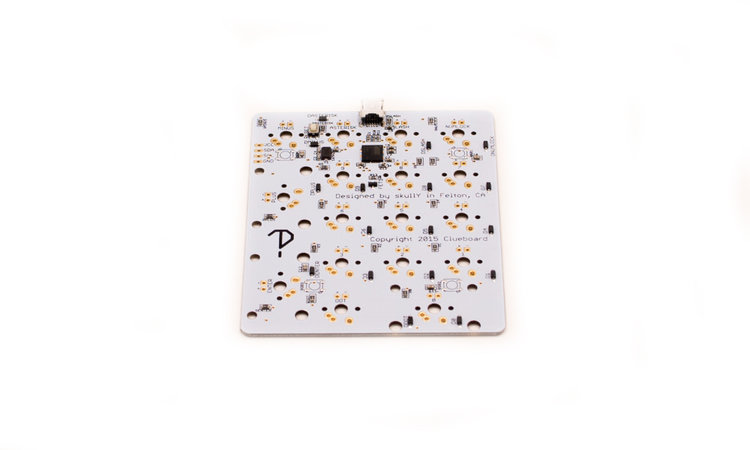
|
||||
|
||||
A basic 17 key numpad PCB.
|
||||
|
||||
* Keyboard Maintainer: [Zach White](https://github.com/skullydazed)
|
||||
* Hardware Supported: Cluepad PCB 1.0
|
||||
* Hardware Availability: [clueboard.co](https://clueboard.co/)
|
||||
|
||||
Make example for this keyboard (after setting up your build environment):
|
||||
|
||||
make cluepad-default
|
||||
|
||||
See [build environment setup](https://docs.qmk.fm/build_environment_setup.html) then the [make instructions](https://docs.qmk.fm/make_instructions.html) for more information.
|
||||
|
|
|
|||
|
|
@ -52,14 +52,14 @@ OPT_DEFS += -DBOOTLOADER_SIZE=4096
|
|||
# Build Options
|
||||
# comment out to disable the options.
|
||||
#
|
||||
BOOTMAGIC_ENABLE ?= yes # Virtual DIP switch configuration(+1000)
|
||||
# MOUSEKEY_ENABLE ?= yes # Mouse keys(+4700)
|
||||
# EXTRAKEY_ENABLE ?= yes # Audio control and System control(+450)
|
||||
# CONSOLE_ENABLE ?= yes # Console for debug(+400)
|
||||
# COMMAND_ENABLE ?= yes # Commands for debug and configuration
|
||||
NKRO_ENABLE ?= yes # USB Nkey Rollover - if this doesn't work, see here: https://github.com/tmk/tmk_keyboard/wiki/FAQ#nkro-doesnt-work
|
||||
BACKLIGHT_ENABLE ?= yes # Enable numpad's backlight functionality
|
||||
RGBLIGHT_ENABLE ?= yes
|
||||
# MIDI_ENABLE ?= YES # MIDI controls
|
||||
# UNICODE_ENABLE ?= YES # Unicode
|
||||
# BLUETOOTH_ENABLE ?= yes # Enable Bluetooth with the Adafruit EZ-Key HID
|
||||
BOOTMAGIC_ENABLE = yes # Virtual DIP switch configuration(+1000)
|
||||
# MOUSEKEY_ENABLE = yes # Mouse keys(+4700)
|
||||
# EXTRAKEY_ENABLE = yes # Audio control and System control(+450)
|
||||
# CONSOLE_ENABLE = yes # Console for debug(+400)
|
||||
# COMMAND_ENABLE = yes # Commands for debug and configuration
|
||||
NKRO_ENABLE = yes # USB Nkey Rollover - if this doesn't work, see here: https://github.com/tmk/tmk_keyboard/wiki/FAQ#nkro-doesnt-work
|
||||
BACKLIGHT_ENABLE = yes # Enable numpad's backlight functionality
|
||||
RGBLIGHT_ENABLE = yes
|
||||
# MIDI_ENABLE = YES # MIDI controls
|
||||
# UNICODE_ENABLE = YES # Unicode
|
||||
# BLUETOOTH_ENABLE = yes # Enable Bluetooth with the Adafruit EZ-Key HID
|
||||
Some files were not shown because too many files have changed in this diff Show more
Loading…
Reference in a new issue